
How to Get Dollar Signs in Excel: Mastering Currency Formatting
In this article, we will explore the different ways to format numbers as currency in Excel. Whether you need to display dollar signs at the beginning, end, or even control decimal places, we’ve got you covered. Learn how to use $ signs like a pro in your spreadsheets!
Unleashing the Power of Excel: Mastering the Art of Dollar Signs
Unleashing the Power of Excel: Mastering the Art of Dollar Signs
Excel is a powerful tool that has revolutionized the way businesses handle data and make informed decisions. With its robust features and functions, mastering Excel can greatly enhance one’s professional skill set and open doors to new opportunities.
One essential aspect of mastering Excel is understanding the significance of dollar signs ($) in formulas and cell references. Dollar signs play a crucial role in making formulas more efficient and flexible.
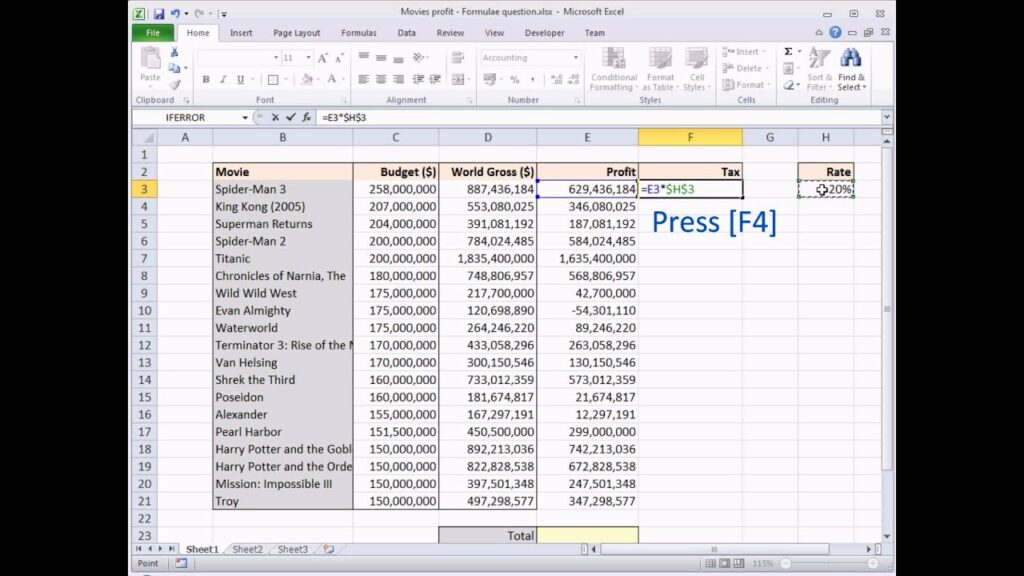
The dollar sign is used in Excel to lock specific references in a formula. When you want a reference to remain constant while copying or dragging a formula to other cells, you can use dollar signs to achieve this.
For instance, $A$1 refers to an absolute reference, which means that both the column and the row will remain fixed when the formula is copied or dragged. This is useful when you want to refer to a particular cell consistently.
On the other hand, $A1 or A$1 refers to a mixed reference. In these cases, either the column or the row will remain constant, but not both. This is handy when you want to maintain consistency in either the column or the row, while allowing the other to change.
Understanding how to use dollar signs effectively can save time and effort when working with large datasets or complex formulas. It ensures that the correct references are used consistently, preventing errors and providing accurate results.
Moreover, mastering the art of dollar signs in Excel can boost productivity by enabling users to create dynamic formulas that automatically adjust to changes in data. This flexibility allows for faster analysis and provides the ability to create reusable templates and models.
In conclusion, unleashing the power of Excel requires a deep understanding of its features, and the effective use of dollar signs is an essential skill to master. With this knowledge, individuals can leverage Excel’s full potential and become proficient in data analysis, reporting, and decision-making.
Remember, mastering Excel goes beyond basic spreadsheet skills. It involves continually learning and exploring its advanced functionalities to stay ahead in the ever-evolving world of technology.
So, embrace the power of Excel and start mastering the art of dollar signs today!
Frequent Questions
Can I use a keyboard shortcut to insert dollar signs in Excel formulas?
Yes, you can use the keyboard shortcut Ctrl + Shift + 4 to insert dollar signs ($) in Excel formulas.
Is there a built-in function in Excel that automatically adds dollar signs to cell references?
Yes, there is a built-in function in Excel called F4 that automatically adds dollar signs to cell references.
Are there any specific formatting options in Excel that allow me to display dollar signs in cells?
Yes, Excel provides specific formatting options to display dollar signs in cells. A common option is to use the “Currency” format, which automatically adds a dollar sign and formats the number with appropriate decimal places and comma separators.
In conclusion, mastering the art of inserting dollar signs in Excel is a valuable skill for anyone navigating the world of technology. By using the $ symbol strategically, one can effortlessly maintain consistency and accuracy in financial calculations, making it an essential tool for accountants, analysts, and business professionals alike. Whether you’re working with complex spreadsheets or conducting data analysis, understanding how to lock in dollar signs will undoubtedly enhance your efficiency and precision. So, embrace this handy Excel feature and let the dollar signs work their magic in your technological journey.

